Analyzing and categorizing internal search terms in CJA

November 25, 2026
If you’ve ever heard me talk about analytics before, there’s a pretty good chance that you’ve heard me talk about how much I love analyzing Internal Search Terms. It’s one of the extremely rare times that your customers are telling you exactly what they’re looking for. You can use this data for so many things!
- Are your customers searching for things that don’t exist? (zero results)
- Are your customers searching for items that are hard to find?
- Is your internal search algorithm poor?
And that’s just a small taste of what you can do. The challenge with this dimension is that it will have a long tail.
For example, adobestore.com has had visits from about 63,000 People in 2026 and they’ve performed only 6,700 searches. On average, that’s 0.11 searches per person - not very many. But also, when I divide Searches by Unique Terms, the result is 3.4 This means every ~3.4 searches, a new term is used. (Keep in mind we’re dealing in averages here, so the distribution is going to be wildly different).

So yeah - all that to say - the long tail is long. You know this, I know this.
As an analyst, when there’s long tails like this, I always look to categorize them. And to me, this seems like a perfect job for Adobe CX Enterprise Coworker to help. If you haven’t heard of it or used it yet, Coworker is Adobe’s fully integrated, built-in AI system to help you.
I’m using CJA here, so my thinking was:
- I’ll ask Coworker to categorize the terms
- I’ll download the categorization as a CSV
- I’ll create a new Schema in AEP
- I’ll upload the CSV to a new AEP Dataset
- I’ll add the new Dataset to CJA and BOOM, I have a new internal search term category
This was my plan, but it didn’t quite work out like this. Follow along my journey to see how it went:
- I’ll ask Coworker to categorize the terms
I opened up Coworker, made sure I was in the right sandbox, and prompted:
Coworker confirmed the details and went to work. A few seconds later:
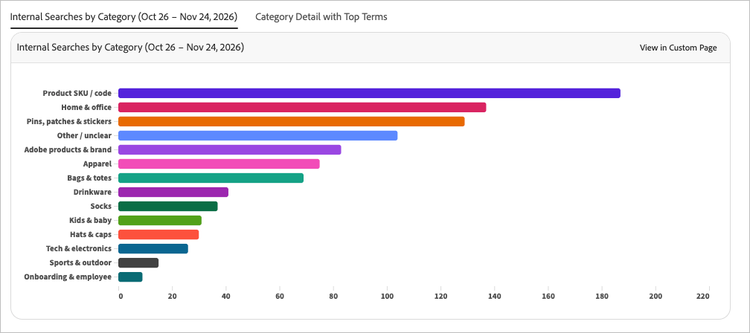
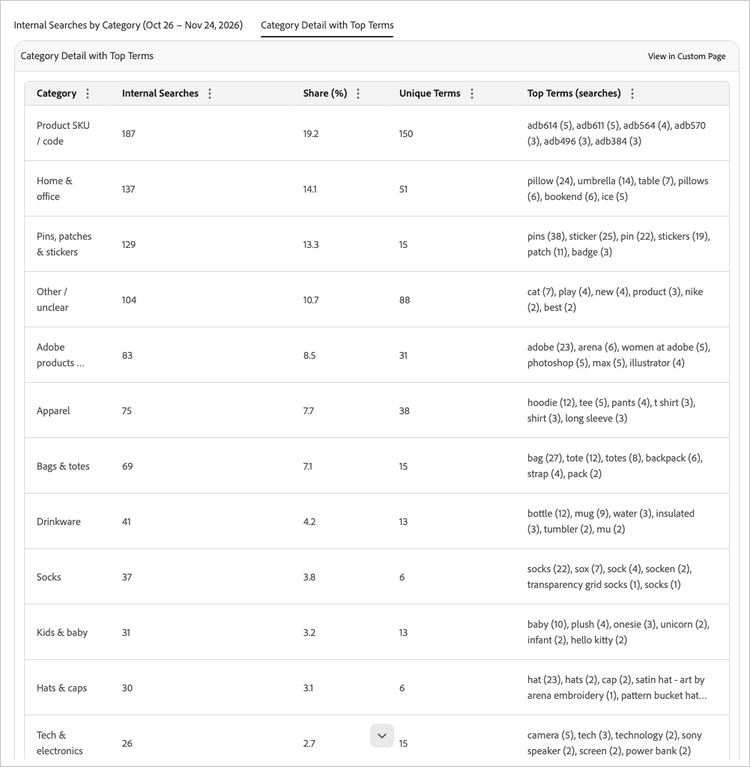
I had my categorization and could even dig into the terms within each category:
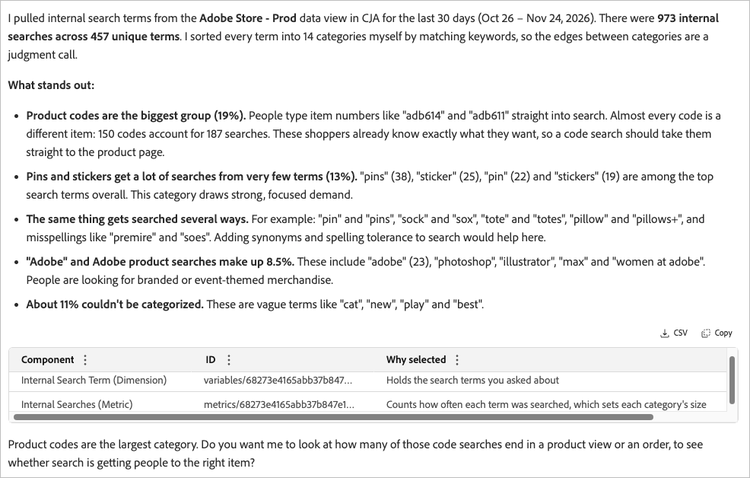
Coworker also had a high-level overview of what stood out, and confirmed which Dimension/Metric it used:
Great!
But this is all in Coworker’s chat interface. I want to bring it to CJA to slice and dice and everything nice. So another prompt:
This is where Coworker surprised me - not only did it create CSV’s for me, it also … offered to create the Class, Schema, and ingest the data into a Dataset for me?

These are Steps 2 through 4 in my plan!
I’ll download the categorization as a CSVI’ll create a new Schema in AEPI’ll upload the CSV to a new AEP Dataset
2-4. I’ll ask Coworker to do all the AEP ingestion!
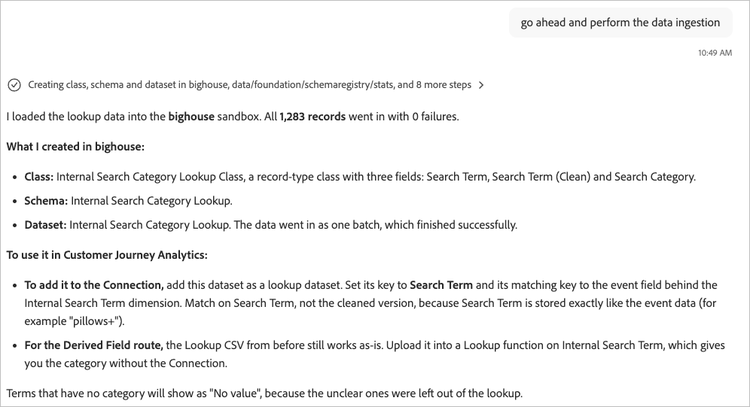
About 90 seconds later and .. everything was ready to go!
Not being one to trust technology (go figure) I clicked on over to the Dataset to Preview the data and it was looking really clean and useful!
5. Add the new Dataset to CJA
Although Coworker does have the ability to: Create Schemas, Create Datasets, Ingest Data into them, and edit Data Views, it can only list/search/inspect the details of CJA Connections. It cannot (yet?) edit Connections.
So I went through the easy process of adding the Dataset to my Connection, set it up as a Lookup in a Derived Field - and bingo bango, I’ve got Internal Search Category!
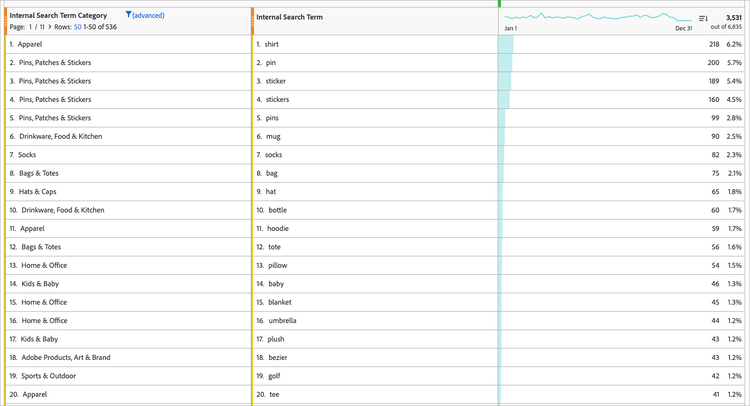
6. Post-ingestion QA
Now that the data is in CJA, I have the chance to do some really easy post-ingestion QA.
Are there categories that should be merged? Let Coworker know the changes you want to make and it’ll push them into AEP. CJA will update automatically.
Terms that aren’t getting bucketed (and instead go to No Value)? Screenshot and ask Coworker to help bucket them.
A couple of gotchas / fixes:
- Make sure the persistence of your new Category dimension is matched with the persistence of your Internal Search Term dimension.
- In your Derived Field, I’d suggest Trimming Whitespace, and Lowercasing the terms.
7. Prepare for the future
As we discussed, the fun thing about Internal Search terms is that it has a long tail. And that tail is just going to keep getting longer. So set up an Alert in CJA to proactively inform you of Internal Search Terms that are not bucketed into a category. Maybe set it up for the first of the month.
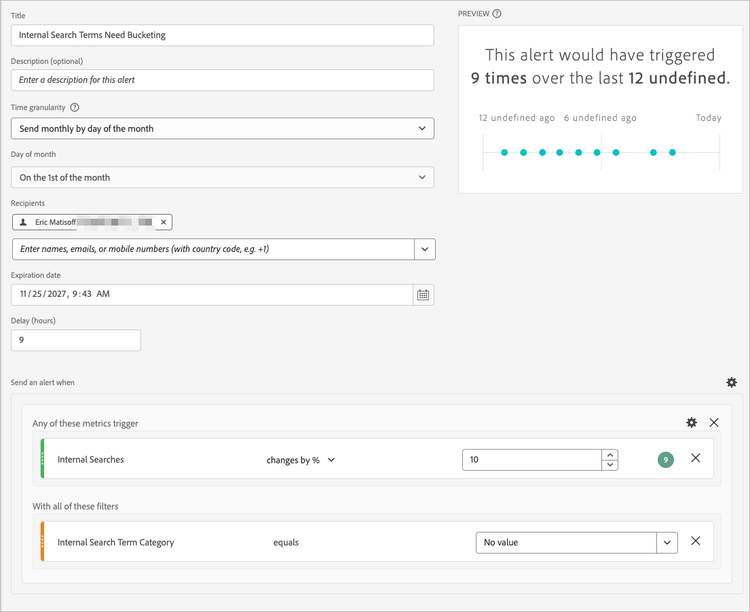
Go forth and analyze and bucket those search terms, you Rockstar you!