Migrating Blogs to Adobe Experience Manager Edge Delivery Services
January 21, 2026
I’m excited to share that I spent a little bit of time this week migrating my site from using a … different CMS to using Edge Delivery Services in Adobe Experience Manager. As you probably know, I am not a developer. Yes, I have a degree in Computer Science and yes I’m comfortable in HTML and JavaScript, but these days? Let’s just say that I do a lot of Googling and asking Copilot for help.
So when a friend at Adobe said “Hey - you should switch to using Edge Delivery Services” I can’t say that I was expecting to be successful. Thankfully, Adobe has released this incredibly easy to follow tutorial.
Oh, and did I mention that it’s free? That’s right - FREE FROM ADOBE! You can migrate your blog to Edge Delivery Services using Doc-Based Authoring. And honestly? You can probably get it done in a day.
Why would I do this?
Ok now you’re asking the right question. Why would I do this? My content was fine on the old CMS and the biggest issue with it was that it wasn’t Adobe technology (though of course I had the Web SDK on there)
Well, here’s the big reason:
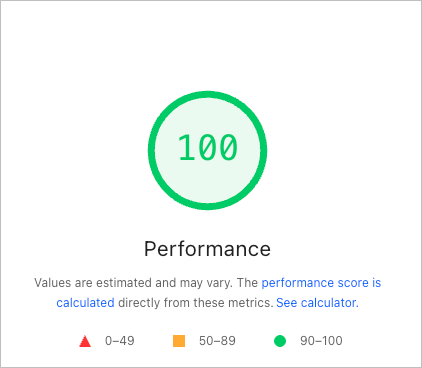
That’s right!
100 for Performance in Google’s Lighthouse score!
Drop your site in here and see how it compares:
Google Pagespeed insights
Did you get a 100 like I did?
Edge Delivery Services is optimized in so many ridiculous ways to ensure your site loads fast and that Google knows it.
Oh and don’t worry, Adobe provides some great tips for ensuring your site Keeps a Lighthouse Score of 100.
Another key reason to migrate to Edge Delivery Services using Doc-Based Authoring is …
Doc-Based Authoring
Doc-based Authoring means that right now, I’m not coding HTML, or writing CSS, or JavaScript. I’m literally just typing in a Google Doc. Here’s proof:
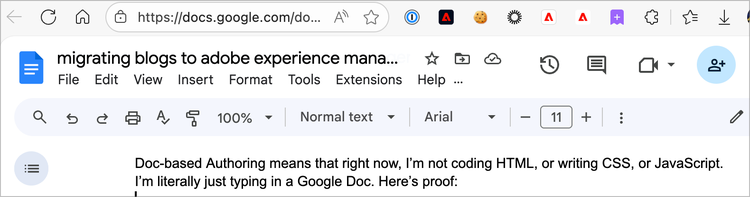
(yes that screenshot is a bit meta)
Adobe built this slick little plugin called the AEM Sidekick that allows me to manage the content I create in Google Docs so that it gets pushed to a Dev server and published to a Production server. Ah, so nice to be rid of FTP … public_html? Blech.
And by the way, if you’re not into Google Docs, Doc-Based Authoring also supports Microsoft SharePoint, along with a few other options.
So now that you know the Why, let’s discuss the How.
How did I do this?
Like I said, I mostly just followed that tutorial. As someone that is, as mentioned, not a developer, nor especially strong at using Github, it was incredibly easy to follow along.
Within minutes I had set up the boilerplate site. I then basically just copied my existing articles (just highlighted the live content in my browser) into Google Docs. Everything came along with it, styling, images, links, etc. It was … actually really painless. Of course, it was easier for me because my articles aren’t over-complicated and also I don’t write often enough (note to self: write more).
I then had my site hosted by EDS right here:
https://main--rockstar--ericmatisoff.aem.live/
Next, I needed to redirect my domain. I was hoping it’d be as easy as a CNAME in my DNS, but that wasn’t quite enough. Thankfully, Adobe has great docs for setting this up too - I chose the Cloudflare route (because .. I dunno, it just seemed like it’d be free and easy, and it mostly was!)
First I went through the steps to automatically invalidate cache with every publish (this way Cloudflare isn’t caching content on my domain if it’s been updated), then I set up the CNAME in the DNS and a few other things.
Which leads me to…
What went wrong?
Honestly, not that much. Just … follow those docs to a tee. It’s a bit challenging at times because Cloudflare is always changing it’s UI, so there’s a chance some of the docs are slightly out of date. Also, don’t gloss over any of the steps (the way that I did) as there is some gold in the explanations.
The hardest part was probably the Worker setup - but that was only because some of the Cloudflare UI has changed. The team is in the process of updating the AEM documentation to align with the latest.
I ended up having to phone a friend here at Adobe for help because the cache wasn’t getting invalidated automatically. It turns out this was due to a little bit of information missing from one of the docs (SERIOUSLY - It wasn’t my fault!). The team is in the process of updating the docs, but if you get to the Push Invalidation for Cloudflare step and the table looks like this:
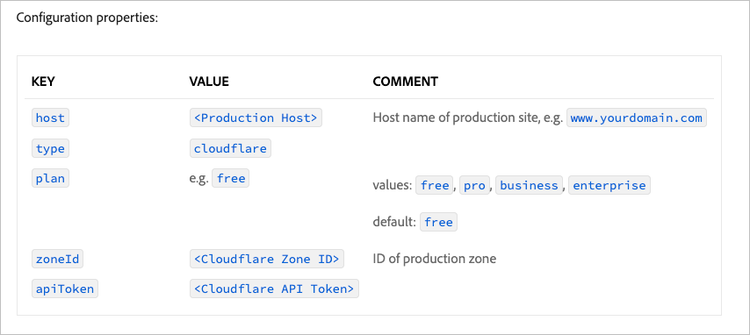
Just know that each of the keys should actually be prepended with cdn.prod.
So instead of host, it should be cdn.prod.host (and cdn.prod.type, etc).
So what’s next?
Two big steps are next:
- Add the Adobe Experience Platform Web SDK to the site. And again, Adobe comes to the table with an easy to follow tutorial once again. I’m looking forward to giving it a shot!
- Add some style. If you know anything about me, you know I care about style (and this is where I can hear my wife laughing at, not with, me). Today, the blog is basically vanilla, aem boilerplate. I want to add some custom fonts, styles, etc. So that will take some learning, but I’m looking forward to it.
So yeah! I’m excited for my awesome new warp speed blog powered by Edge Delivery Services and these next steps are going to be a fun journey! I’ll be sure to post about them too.
Go forth and migrate your blogs to Edge Delivery Services, you Rockstar you!