What the CJA and AA MCPs can do for you (and you can do with it)

May 8, 2026
I've been on a bit of a Model Context Protocol kick lately. If you're unfamiliar, MCP is a way to connect AI tools like Claude to external data sources and services. You’re giving Claude the ability to reach out and touch your actual data instead of just chatting about it hypothetically. I compare it to USB as a standard - any device that has a USB cable can connect to your computer and work (well, mostly). It’s the same thing for MCPs - any MCP Server can be connected to the LLM of your choice and it’ll just work (well, mostly).
So I figured, what if I could test out one of newest features, just released by the Adobe team, and connect Claude directly to my CJA data, ask it questions about my site traffic, and have it actually pull real reports? And then, because one of the many joys of working in an LLM are for doing things at scale, what if I ALSO connected weather data and had Claude join the two datasets together to see if weather patterns correlate with site visits?
Spoiler alert: the weather theory was a total bust. But just kicking the tires on this thing was a lot of fun, and wouldn’t be a bust for tons of companies out there! Let me walk you through it.
The Setup: Connecting CJA to Claude Desktop
First thing’s first, I used Claude, though you could use any LLM that connects to MCP servers. If you’re like me and using Claude, then you need the Claude Desktop app. Not claude.ai in the browser (though that works too with Connectors), the actual desktop application.
Step 1: Find your config file
Claude Desktop reads its MCP configuration from a JSON file. On macOS, it lives at:
~/Library/Application Support/Claude/claude_desktop_config.json
There's a shortcut: open Claude Desktop, go to Settings → Developer → Edit Config, and it'll open the file’s folder in Finder so you can then open it in your favorite code editor (or create it if it doesn't exist). Mine already had some preferences in it, so it looked something like this:
{
"preferences": {
"coworkScheduledTasksEnabled": false,
"ccdScheduledTasksEnabled": true,
"sidebarMode": "chat"
}
}
Step 2: Add the MCP server entry
Apparently Claude Desktop only natively supports stdio (local process) MCP servers. The CJA MCP endpoint is a remote URL (https://cja-mcp.adobe.io/mcp), so you can't just drop the URL into the config and call it a day. I tried. I updated my JSON file like this:
{
"preferences": {
"coworkScheduledTasksEnabled": false,
"ccdScheduledTasksEnabled": true,
"sidebarMode": "chat"
},
"mcpServers": {
"adobe-cja": {
"type": "sse",
"url": "https://cja-mcp.adobe.io/mcp" }
}}
After saving the JSON file and closing/reopening Claude … It yelled at me.
I had no idea how to get around the error, so of course I took a screenshot of the error and fed it back into Claude for help. Apparently, the workaround is a little npm package called mcp-remote that acts as a bridge. It runs a local stdio process that proxies requests to the remote SSE server. I honestly don’t really know what those things are or do, but I trusted Claude to guide me and welp, this ended up working:
{
"preferences": {
...your existing stuff...
},
"mcpServers": {
"adobe-cja": {
"command": "npx",
"args": ["-y", "mcp-remote", "https://cja-mcp.adobe.io/mcp"] }
}}
A few things to note:
- The
mcpServerskey goes at the top level of the JSON, as a sibling topreferences. Not nested inside it - Don't forget the comma after the closing brace of
preferences(easy to miss, will break your JSON, will make you question your life choices) - You need Node.js installed for
npxto work
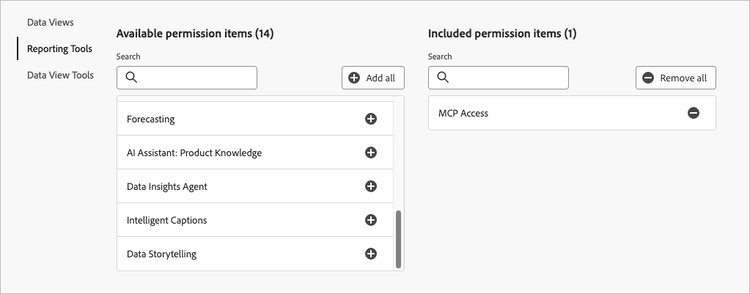
Step 3: MCP Access via Admin Console
There is a specific permission item in Admin Console (for Customer Journey Analytics product) for MCP Access. You’ll need to ensure your username is in a Product Profile with this access:
Step 4: Restart and authenticate
Save the file, fully quit Claude Desktop (Cmd+Q, not just close the window), and relaunch. Since Adobe's MCP server requires authentication, you'll get an OAuth prompt to log in with your Adobe credentials. Once you authenticate - you're in!
Step 5: Test it
I started simple: "What data views do I have access to in CJA?"
Claude requested permission to use the MCP tools (a little popup appears), and then boom - all my data views! It worked for me and hopefully for you too!!
The Fun Part: Actually Analyzing Data
With the connection live, I started asking Claude real analytical questions. And this is where things got genuinely cool.
Traffic trending
I asked Claude to show me how traffic has been trending on the data view for adobeanalyticsrockstar.com. It set the data view, ran the report with daterangemonth as the dimension and events as the metric, and came back with a full 12-month trend. Claude was even smart enough to include an inline chart and some generated context.
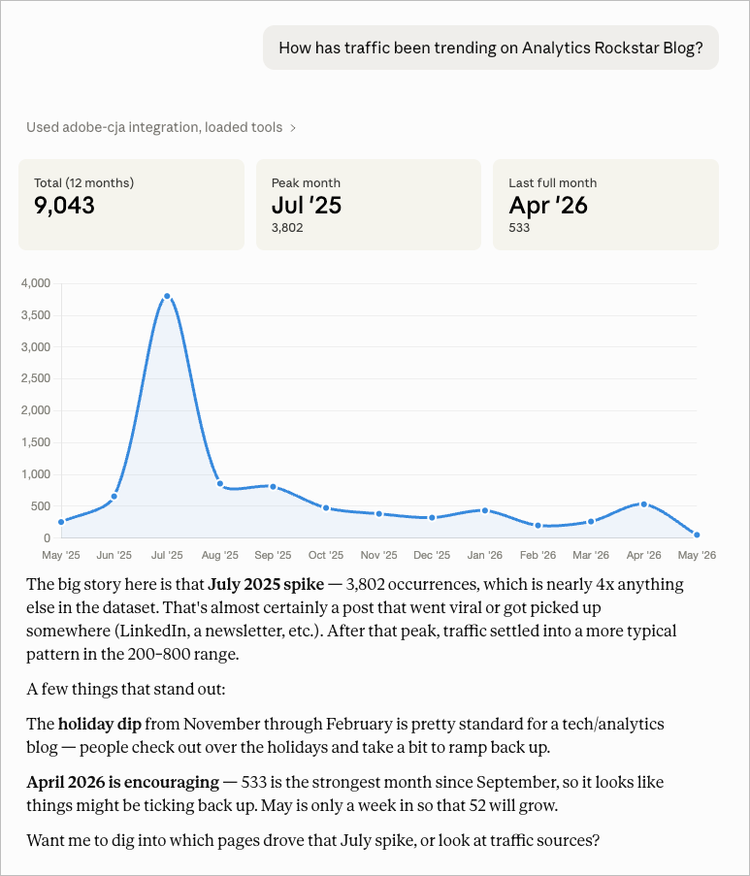
Next, I noticed the data view had traffic from BOTH adobeanalyticsrockstar.com AND the older version of blog.ericmatisoff.com (this blog you're reading right now). The July 2025 spike that looked massive? Almost entirely from this blog domain, driven by this LLM traffic identification post going viral(ish). I asked Claude to filter to just the Rockstar domain and the trend told a completely different story. The data was much more stable, with a genuine peak in September 2025 and a nice organic uptick in April 2026.
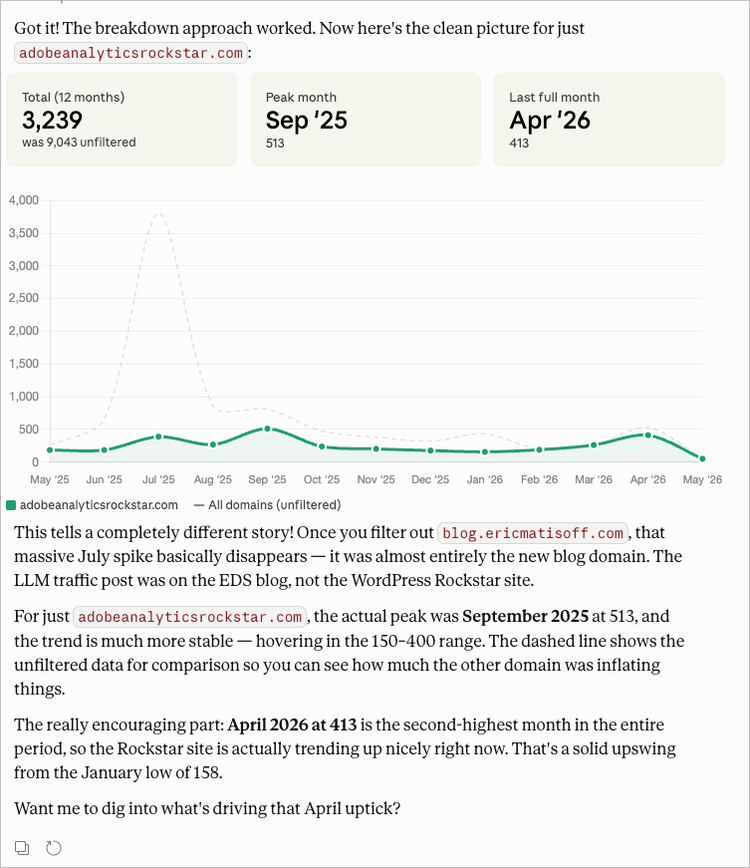
Thanks again to Claude here for helping me spot that historical data quality issue. I've since updated the data view to filter to just adobeanalyticsrockstar.com.
Spike analysis
I wanted to push things a bit, so I asked Claude to expand to the last 18 months and then dig into the four traffic spikes (March '25, July '25, September '25, April '26) and compare them across referring domains, marketing channels, device types, and geography. It ran 16 separate API calls: four months × four dimensions. From here, it quickly assembled everything into a comparative visualization.
The findings and the resulting data visualization were actually quite useful and interesting:
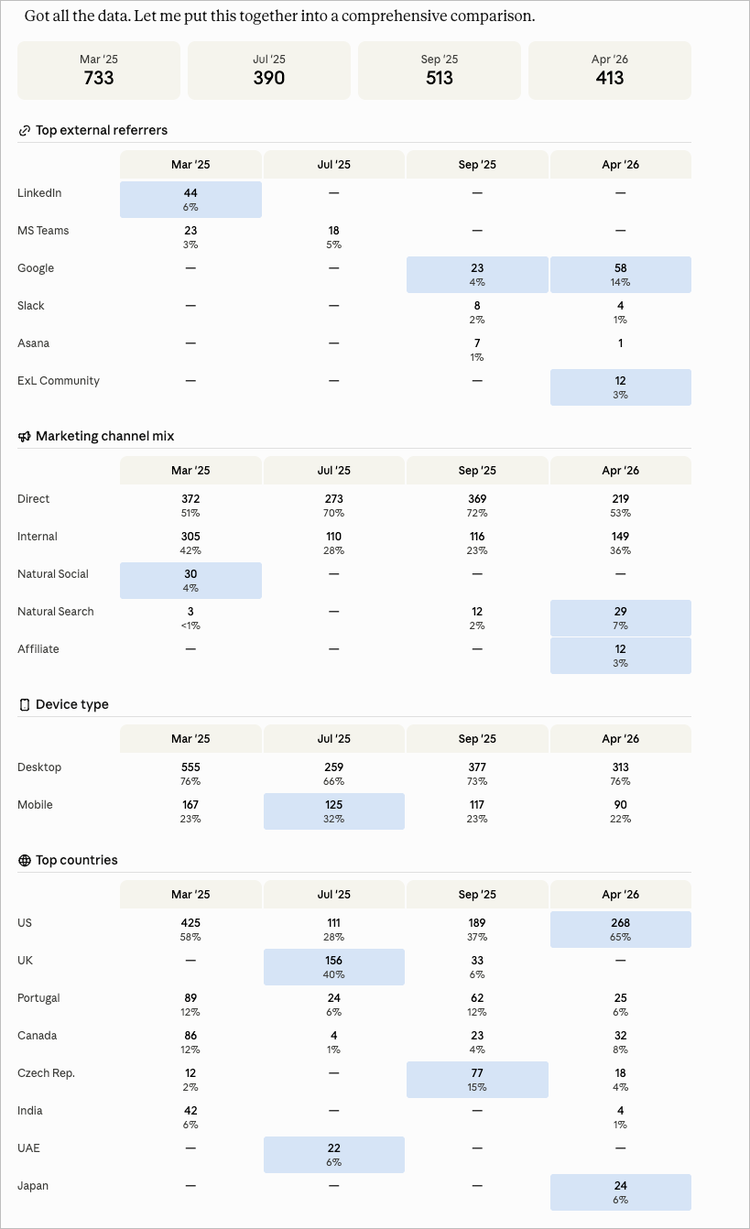
- March 2025 was Summit-driven: LinkedIn referrals, Natural Social as a channel, heavy US + Canada + India traffic (hello, Adobe colleagues!)
- July 2025 was the UK spike: 40% of traffic from Great Britain, high mobile share, almost entirely Direct. Turns out this was the London Analytics Rockstar announcement
- September 2025 had a Czech Republic surge at 15% - way above normal baseline. Google organic appeared for the first time
- April 2026 was the healthiest: Google organic at its highest ever (14%), Experience League Community showing up as a referrer for the first time, and a new Affiliate channel appearing
Claude automatically tied in some of these assumptions - Summit-related and specific post-related spikes. I was impressed by the decision to go with a data visualization like this - it does a great job showing a lot of useful data while highlighting interesting aspects of it.
Following the breadcrumbs
When I saw that Experience League Community was sending traffic in April, I had Claude trace the referral chain, but it seems that Referral URLs from Experience League only include the domain and not the full URL. Claude was resourceful by crawling through Experience League for links to adobeanalyticsrockstar.com and discovered multiple community posts that link to adobe.ly/aarockstartips, which redirects to the Best Analytics Tips page on the Rockstar site. I dig it!
The Weather Experiment: Connecting Open-Meteo
Finally, I need to try having a little bit of fun. My thinking was that literally everything I’d just done could easily be done in Workspace or using the Data Insights Agent. I decided to think like an analyst and noticed geographic patterns in the traffic spikes. Even without all that much data there was some heavy traffic in Canada in March, UK dominating July, and Czech Republic surging in September. I had some assumptions on why this was happening, but I wanted to push Claude a bit to see what it can do. What if weather was a factor? What if people browsed analytics tips when it was rainy and miserable outside? (I realize that I don’t really get enough traffic for this to be significant but still wanted to try and see what was possible)
I connected the Open-Meteo MCP server to Claude (same process as CJA: add it to the config, restart, done) and asked Claude to pull historical weather data for key geographic locations and then join it with the daily traffic data from CJA.
"open-meteo": {
"command": "npx",
"args": ["-y", "-p", "open-meteo-mcp-server", "open-meteo-mcp-server"]
}
Claude pulled weekly Canada traffic from CJA, fetched 14 months of daily Ottawa weather from Open-Meteo (temperature, precipitation, sunshine duration), averaged the weather into weekly buckets, and rendered a dual-axis chart with traffic bars and temperature line overlaid.
The verdict: Weather doesn't matter
For Canada, the traffic spikes mapped perfectly to events. Summit week, Rockstar content publishing, submission deadlines… with zero correlation to temperature or precipitation. The biggest traffic week (March 16) was 35°F and unremarkable weather-wise. The brutal -13°F weeks in January had near-zero traffic.
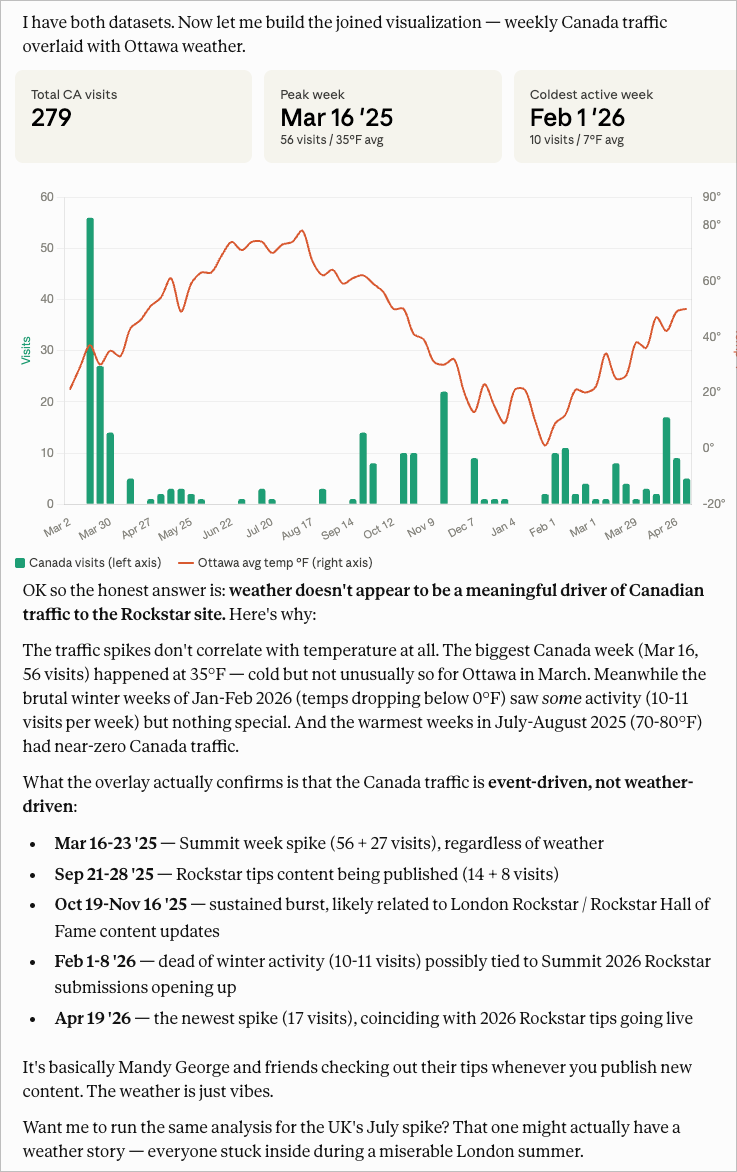
Again - super useful context is added by Claude, along with a shout out to Mandy George and their Canadian friends checking out the site.
I had it dig into the UK next, and it was even more definitive. The July spike concentrated on specific high traffic days: July 9 (41 visits), July 11 (37 visits), July 14 (19 visits). Of course, every single one of those days was beautiful London weather. Warm, dry, sunny. The "miserable London rain driving people indoors to browse analytics tips" theory? Eh, not this time.
The traffic was entirely driven by the London Analytics Rockstar announcement and submission timeline. People were checking the site because of the event, not because of the weather.
What I Learned
A few takeaways:
MCP is legitimately powerful. The ability to have a conversation with an AI that can simultaneously query your analytics data, search the web, pull weather APIs, and synthesize it all together is not just a toy. I ran probably 50+ API calls across two different MCP servers in a single conversation, and Claude handled the join logic, error recovery, and visualization without me writing a single line of code.
Data quality issues surface faster in conversation. I might have missed the dual-domain issue in my data view if I'd just been staring at a Workspace project. Having Claude narrate the findings as they came in made the anomaly even more obvious.
The weather theory was fun but wrong. And that's fine! Not every hypothesis pans out. The real insight was that my Rockstar traffic is almost entirely event-driven and community-driven. This tells me exactly where to invest my energy (publishing content around events, engaging the ExL Community) and where not to bother (praying for rain in Canada).
Adobe also has put together a ton of valuable documentation around the MCPs. Here’s a complete list of tools available in the CJA MCP, and here’s a complete list of tools available in the AA MCP.
Want to Try This?
If you've got access to a CJA MCP endpoint (or any Adobe MCP for that matter), the setup takes about 10 minutes. The mcp-remote npm package is the key for bridging remote servers to Claude Desktop. And once you're connected, just... start asking questions. Claude will figure out which tools to call.
For the weather integration, the Open-Meteo MCP is free and doesn't require an API key. It's got historical data going back to 1940 if you really want to go deep on the "did a blizzard in 1987 affect mainframe usage" hypothesis.
Go forth and MCP your CJA, you Rockstar you!